
AI dashboards
AI dashboards that explain what changed and what needs attention.
Turn connected app activity into AI operations dashboards, briefings, recommendations, and snapshots.
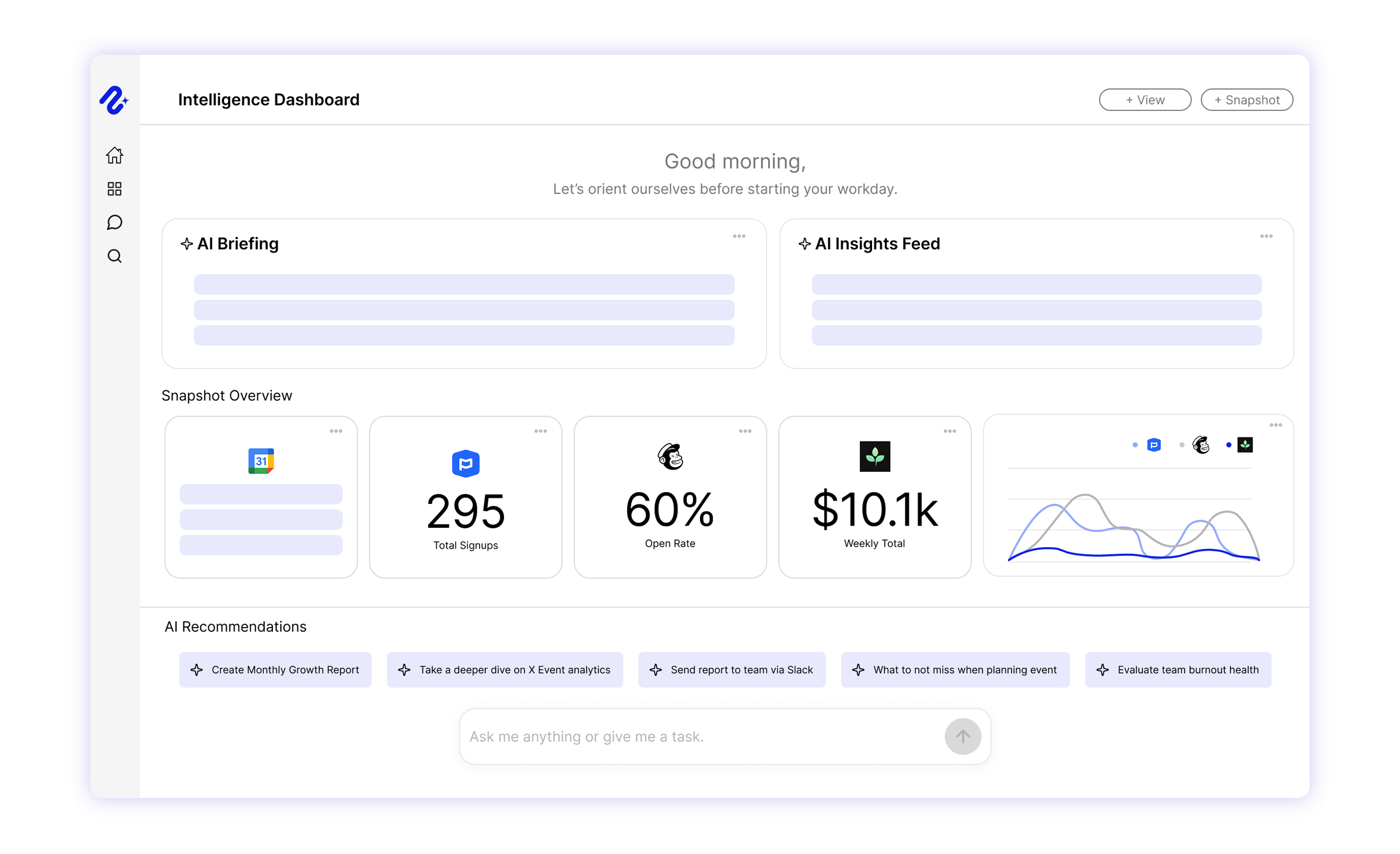
AI operations dashboards
AI dashboards for operating reviews, not just chart tracking.
Nurii brings church attendance, serving, giving, events, communication, and follow-up into one leader-ready view.
See cross-tool signals in one shared view.
Turn recent activity into briefings and recommendations.
Give leaders and operations teams the same operating context.
Capabilities
How Nurii supports dashboards.
Use dashboards for morning briefs, weekly operating reviews, and shared views of connected signals.
- Personal, organization, and team dashboard scopes
- AI briefings based on connected tools and selected context
- Snapshot cards for metrics, recent activity, and source-specific detail
- Clear labels when data is current, syncing, incomplete, stale, or unverified
- Recommendations that point teams toward likely follow-up
Use cases
AI dashboard use cases for business and operations teams.
Explain what changed and where attention should go next.
Church-wide leadership review without collecting a manual update from each ministry
Focused dashboards for executive pastors, operations, ministry, finance, campuses, or nonprofit programs
Morning briefs for volunteer needs, participation changes, financial movement, and unresolved follow-up
FAQ
Questions about dashboards.
What is an AI operations dashboard?
It combines connected signals, summaries, recommendations, and follow-up context to explain what changed.
How are Nurii dashboards different from BI dashboards?
BI dashboards emphasize charts. Nurii adds operating reviews, briefings, snapshots, recommendations, chat, automations, and approved action.
Can different teams have different dashboard views in Nurii?
Yes. Personal, organization, and team views keep each audience focused on its operating questions.
Which integrations are most useful for AI dashboards?
Churches can start with Planning Center and the systems needed for one weekly review. Other teams may start with analytics, CRM, projects, or finance.
Can dashboards turn into follow-up work?
Yes. A snapshot or recommendation can lead to AI chat, automations, or approved actions.
Related platform
Explore related features.
Useful integrations
Connect the source tools.

Google Analytics
Ask questions about selected GA4 properties with clear property access limits.
View integration
Planning Center
Use approved Planning Center data in church dashboards, recurring reports, volunteer coverage checks, and reviewed follow-up.
View integration
QuickBooks
Bring finance signals into dashboards, reporting, and approved accounting workflows.
View integration
Slack
Search selected Slack context, deliver automation reports, and keep teams aligned.
View integrationPut dashboards to work across your church systems.
Map the source data, first output, and review owner.