
Memory
AI memory that preserves useful context without blurring the source of truth.
Preserve approved preferences and working patterns while keeping Knowledge and connected app data separate.
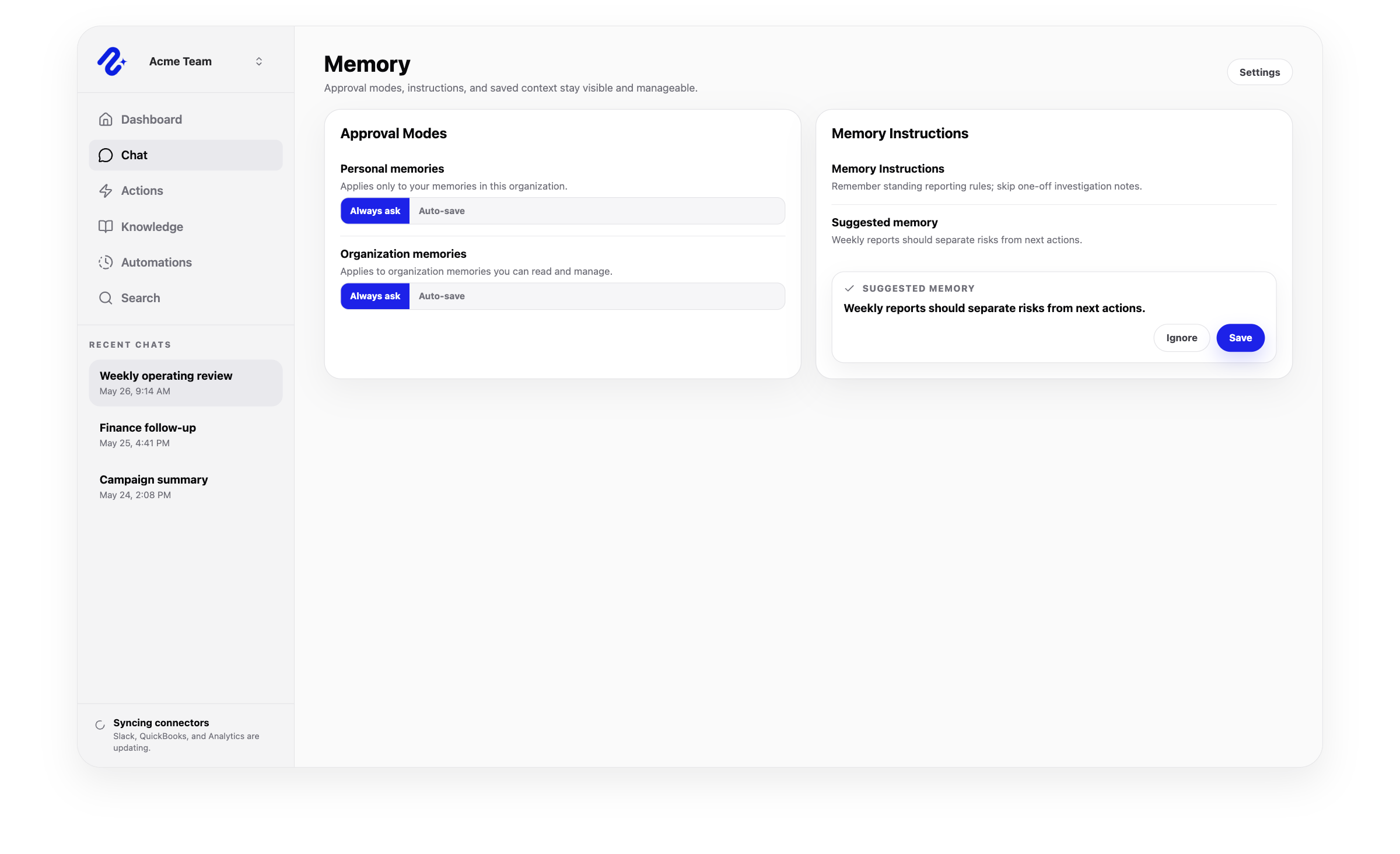
AI memory for teams
AI memory for durable preferences, not a replacement for the source of truth.
Memory preserves durable preferences and patterns without replacing current source data or Knowledge.
Keep durable preferences available across future sessions.
Preserve useful organization context without saving every one-off chat detail.
Use memory alongside Knowledge, permissions, and connected app data.
Capabilities
How Nurii supports memory.
Preserve how your team works while grounding facts in current sources.
- Personal and organization memory patterns
- Approved memory for durable context and recurring preferences
- Boundaries between memory, Knowledge, and current connector context
- Continuity for chat, dashboards, automations, and action proposals
Use cases
AI memory use cases for teams.
Save repeated preferences, not documents, live records, or maintained facts.
Remember reporting preferences, ministry terminology, and team-specific working context
Keep future sessions aligned with approved communication and review preferences
Avoid repeating stable preferences while keeping people, giving, attendance, and program facts grounded in source systems
FAQ
Questions about memory.
What is AI memory for teams?
It preserves durable preferences, terminology, patterns, and instructions across sessions.
What should become memory in Nurii?
Save durable preferences, patterns, terminology, and recurring instructions.
What should not become AI memory?
Do not save temporary chat details, current facts, one-time observations, or source documents as memory.
How does memory work with Knowledge?
Knowledge holds sources and maintained context. Memory holds preferences for using them.
Why does Nurii separate memory from source-of-truth data?
Separation keeps old chat context from becoming the authority for current facts.
Related platform
Explore related features.
Useful integrations
Connect the source tools.
Google Calendar
Query selected calendars and bring event context into planning, reports, and AI chat answers.
View integration
Google Drive
Attach chosen files to AI chat conversations through the Drive picker.
View integration
Notion
Sync pages, blocks, databases, and workspace context for searchable team knowledge.
View integration
Slack
Search selected Slack context, deliver automation reports, and keep teams aligned.
View integrationPut memory to work across your church systems.
Map the source data, first output, and review owner.