
AI automations
AI automations that run on a schedule or when work changes.
Run AI workflow automation on schedules or supported events for reports, monitoring, reviews, and approved follow-up.
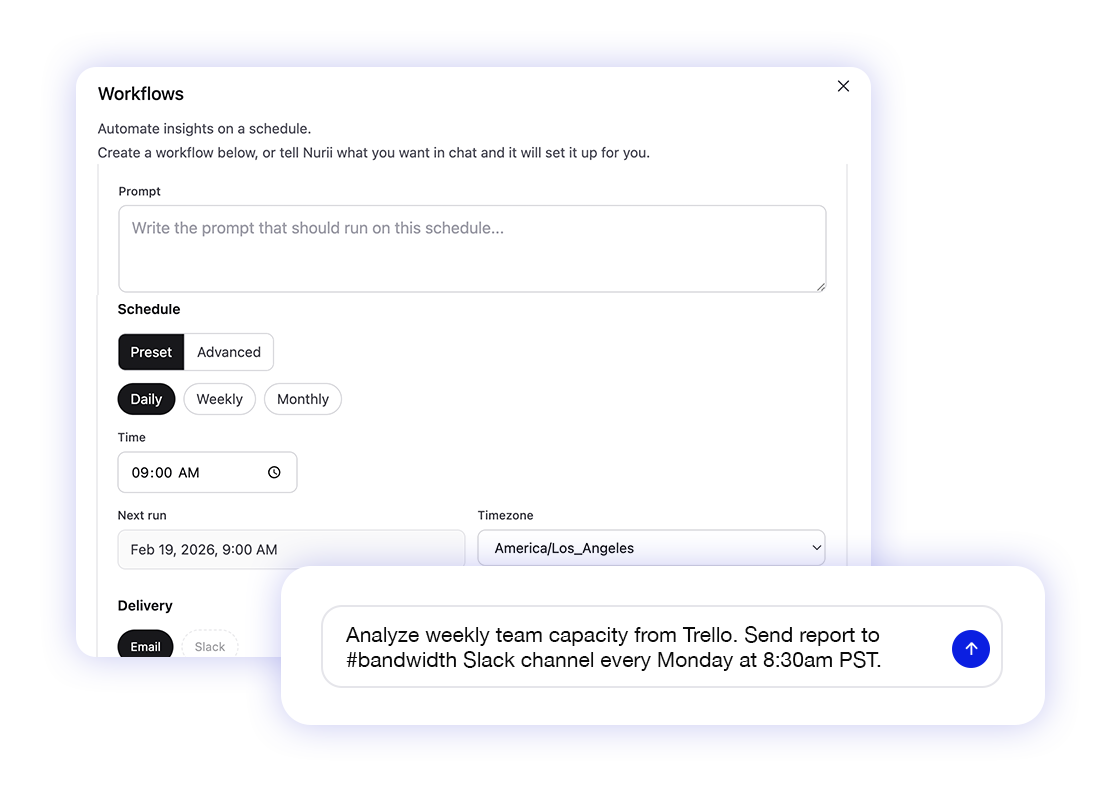
AI workflow automation
AI workflow automation for schedules, work events, reports, and follow-up.
Turn recurring questions and supported project, church, audience, or finance changes into AI workflows without rebuilding prompts.
Run daily, weekly, monthly, advanced scheduled, or supported event-triggered AI workflows across project, church, marketing, and finance tools.
Deliver reports to email or Slack where the team already works.
Review follow-up actions or allow selected actions to run automatically.
Capabilities
How Nurii supports automations.
Run weekly summaries, monitors, event-triggered reviews, and follow-up drafts.
- Scheduled reports for recurring operating questions
- Asana event starts for task additions, section moves, assignment changes, completion changes, due-date changes, keyword-matching text changes, and new comments
- Trello event starts for new cards, list moves, member changes, due-date changes, archived changes, and new comments
- Planning Center event starts for selected apps when records are added, changed, or removed
- Mailchimp event starts for selected audiences when contacts subscribe, update, unsubscribe, or become undeliverable
- QuickBooks event starts for selected finance records when supported records are created or updated
- Monitoring prompts for changes, risks, and follow-up needs
- Email and Slack delivery targets
- Staff-controlled actions and dependent follow-up
Use cases
AI workflow automation use cases.
Define the question, start condition, delivery target, and allowed actions.
Weekly church leadership reports across attendance, serving, giving, events, communication, and follow-up
Volunteer coverage and event-readiness reviews before the weekend
Asana task-triggered reviews when work is added, moved, assigned, completed, reopened, due-date changed, keyword-matched, or commented on
Trello card-triggered reviews when work is created, moved, assigned, due-date changed, archived, or commented on
Planning Center reviews when ministry records change in selected apps
Mailchimp audience reviews when contacts subscribe, update, unsubscribe, or bounce
QuickBooks finance reviews when invoices, customers, or other supported records change
Monitor disconnected systems for stale work or important changes
Review actions or allow selected actions to run automatically
FAQ
Questions about automations.
What is AI workflow automation?
AI workflow automation runs reports, monitors, summaries, and follow-up from a schedule or supported event.
What can Nurii automate?
Nurii automates reports, monitors, reviews, follow-up drafts, and supported Asana, Trello, Planning Center, Mailchimp, and QuickBooks event workflows.
Can Nurii automations write to connected systems?
Yes. Actions are off until an authorized person enables them. Review each change or allow selected actions in advance.
Where do automation results go?
Configured workflows can deliver results to email or Slack.
What are good first AI automation workflows?
Start with weekly briefs, campaign summaries, ministry reviews, Planning Center change reviews, Mailchimp audience reviews, QuickBooks invoice reviews, stale-work monitors, or follow-up drafts.
Related platform
Explore related features.
Useful integrations
Connect the source tools.

Asana
Sync projects, tasks, sections, comments, and workspace context for Asana automation, project visibility, and task-triggered workflows.
View integration
Google Calendar
Query selected calendars and bring event context into planning, reports, and AI chat answers.
View integration
Mailchimp
Bring campaign and audience activity into reporting, dashboards, and approved follow-up work.
View integration
QuickBooks
Bring finance signals into dashboards, reporting, and approved accounting workflows.
View integration
Slack
Search selected Slack context, deliver automation reports, and keep teams aligned.
View integration
Trello
Use board, card, list, member, label, due date, and comment context for Trello automation and project visibility.
View integrationPut automations to work across your church systems.
Map the source data, first output, and review owner.