
AI chat
AI chat that understands your organization, not just your prompt.
Ask across connected apps, selected files, Knowledge, dashboards, and approved memory in one business AI chat.
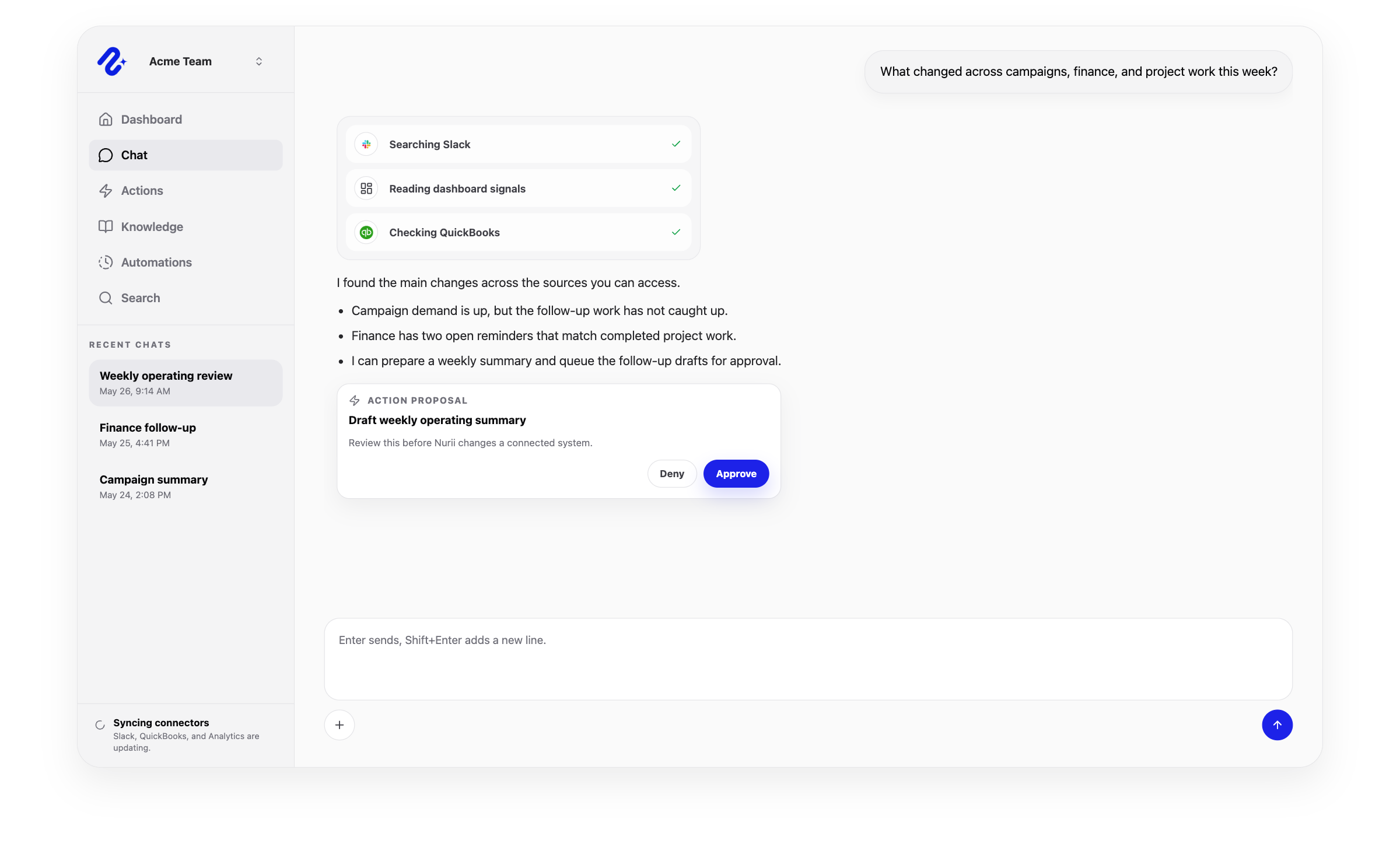
AI chat for business
A business AI chat workspace grounded in connected tools.
Church staff can ask across Planning Center, files, Knowledge, calendars, and other authorized systems without pasting context into a generic chatbot.
Ask across apps, files, team knowledge, and dashboard context.
Keep conversations tied to organization permissions and selected sources.
Move from answer to reviewed follow-up that can continue in the same thread.
Capabilities
How Nurii supports ai chat.
Use Nurii when answers depend on apps, files, team knowledge, permissions, and operating context.
- Org-scoped sessions with recent chats and attachments
- Selected Google Drive files and Knowledge items as explicit context
- Approved memory for durable preferences and recurring working context
- Source-aware answers that can feed dashboards, reports, action proposals, and approval-aware continuation
Use cases
AI chat use cases for teams with cross-app questions.
Move from trusted answers to dashboards, reports, and reviewed follow-up.
Ask which volunteer positions remain open and what approved schedule context may explain the gap
Answer a service-procedure question from current SOPs and selected church files
Compare program, donor, event, and communication context before a nonprofit leadership review
FAQ
Questions about ai chat.
What is business AI chat?
It answers questions from authorized apps, files, Knowledge, dashboards, and approved memory—not only a pasted prompt.
Is Nurii AI chat just a generic chatbot?
No. It uses connected systems, selected files, Knowledge, permissions, and approved memory.
Can Nurii chat use uploaded files and connected apps together?
Yes. It can answer from selected files and connected-app data together.
Can Nurii AI chat answer questions across multiple apps?
Yes, when each app is authorized and within the user's access boundaries.
How does AI chat connect to action?
Teams can review each supported action or allow selected actions in advance, then Nurii continues the work.
Related platform
Explore related features.
Useful integrations
Connect the source tools.
Google Drive
Attach chosen files to AI chat conversations through the Drive picker.
View integration
HubSpot
Read authorized CRM domains and prepare approved CRM object actions.
View integration
Notion
Sync pages, blocks, databases, and workspace context for searchable team knowledge.
View integration
Slack
Search selected Slack context, deliver automation reports, and keep teams aligned.
View integrationPut ai chat to work across your church systems.
Map the source data, first output, and review owner.